
MONA for studios and teams
Your studio's chat, with MONA in the room.
Message your team in channels, DMs, and a chat on every project. Tag @MONA in any thread and the AI that runs your studio answers right there, with the project in hand.
No credit card required
Hudson Street Kitchen
Project chat · 4 members
Maya Chen 10:14 AM
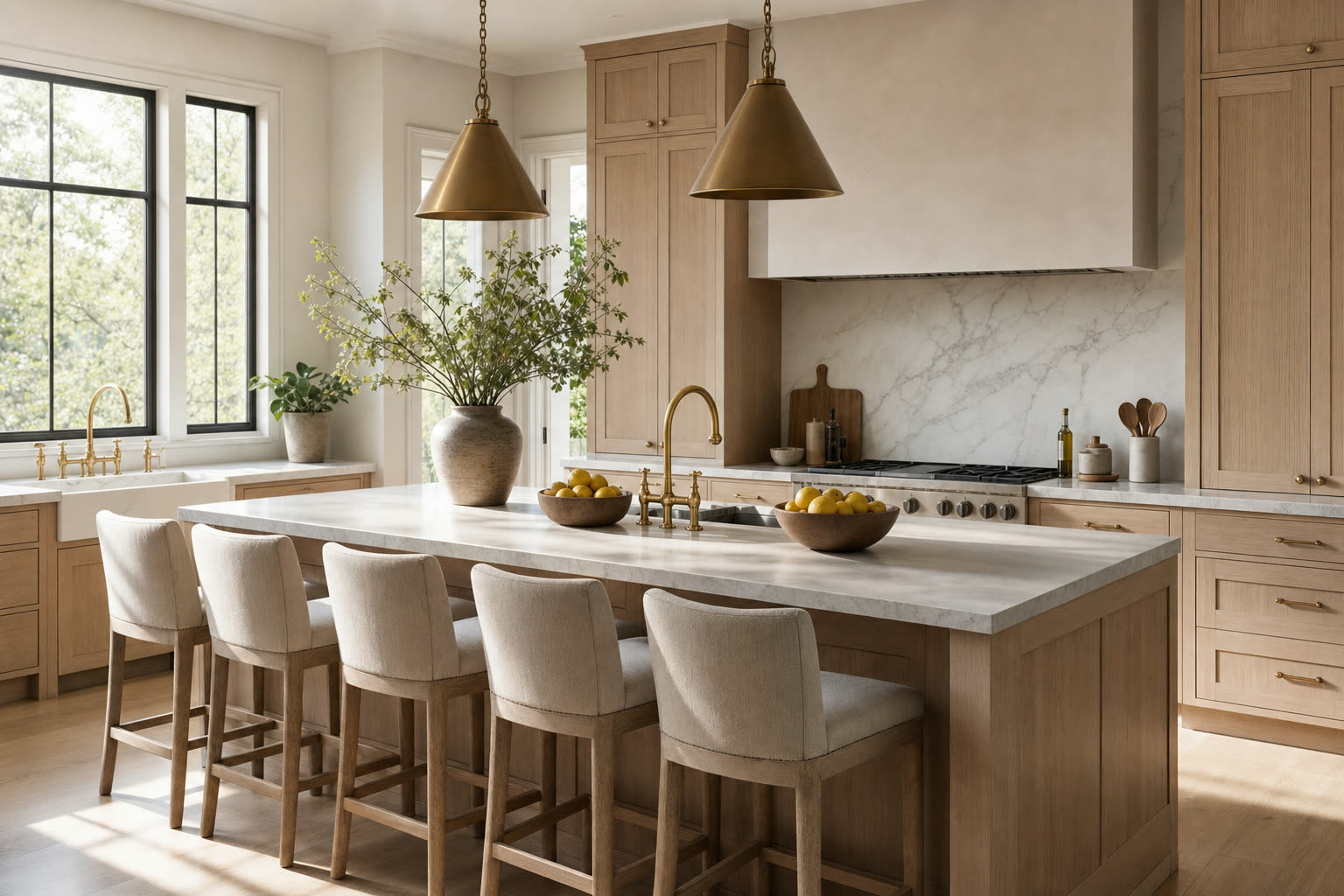
Client approved the walnut cabinetry. @MONA can you render the island with the honed marble top and the brass pendants from the schedule?
MONA 10:15 AM
Here is the island with the honed marble top, walnut fronts, and both pendants. I also marked the cabinetry approved on the schedule.
Leo Park 10:21 AM
Love it. @Maya can you send the client the updated deck before Thursday?
Collaborative AI chat
Work with MONA together.
Most AI chats are one person and a bot. In MONA, your designer can start the sourcing, your project manager can pick it up, and MONA keeps the whole thread straight.
- Share a MONA chat with your studio
- Chats are private by default. Share one with the whole studio, or invite the teammates who need it.
- Can view or Can chat
- Invite a teammate to read along live, or to message MONA in the same chat. MONA knows who is talking.
- Chats that live on the project
- Start a chat from a project and it stays with that project, so MONA always knows which job you mean.
- Nothing gets lost
- Ask MONA about an earlier conversation and it looks it up. Pin the chats you come back to every day.
Park Slope living room sourcing
Park Slope Brownstone
Maya Chen
MONA
Three from your vendors, all in performance fabric and under budget:
- Track-arm sofa, 94 in, performance linen$4,980
- Slipcovered sofa, 90 in, washable twill$5,450
- Curved sofa, 102 in, performance boucle$5,900
Leo Park
MONA
Team messaging
Everything you use Slack for, next to the work.
Channels, groups, and direct messages for the whole studio, plus a chat on every project. The difference is who else is in the room.
Channels and groups
A studio-wide channel for everyone, plus groups for the design team, purchasing, or whoever needs their own room.
Direct messages
Message one teammate or a small group. Formatting, emoji, and reactions work the way you expect.
A chat on every project
Each project has its own chat next to the schedule, files, and client messages, so the conversation stays with the job.
@MONA in any thread
Tag MONA to render a room, update the schedule, pull a quote, or draft a proposal. The reply lands in the thread for everyone.
Pins and a meeting room
Pin the final elevations or the decision you made last week. Each chat can keep a standing meeting room one click away.
Tasks from messages
Ask a teammate for something and MONA offers to make it a task, assigned and tracked, without leaving the chat.
Waiting on you
Every question that mentioned or replied to you, across every chat, collected on your Home screen until you mark it done.
Files from your Library
Attach from your computer or straight from the MONA Library. Files are filed on the project automatically.
Notifications that reach you
Mentions and replies ring the bell and send a desktop push. Choose per chat: mentions only, or every message.
How it works
Up and running this afternoon.
01
Invite your team
Add your designers, purchasing, and project managers to the studio. Everyone lands in the studio channel.
02
Talk next to the work
Open the chat on a project and talk about the job with the schedule, renders, and files right beside it.
03
Tag @MONA
When something needs doing, tag MONA in the thread. It does the work and posts the result where the whole team can see it.
Why in MONA
Your chat app doesn't know your projects.
Team chat is one part of MONA, the agentic operating system for interior design studios. The same AI in your threads also runs your schedules, proposals, invoices, and renders.
The project is already here
Schedules, renders, proposals, invoices, and client messages live in MONA. The conversation about them should too.
MONA can act, not just answer
A general chat app can hold the message. MONA can render the room, update the line item, and draft the email.
One less tool to manage
Team chat comes with your MONA studio. No separate workspace to set up, pay for, or keep in sync.
Questions
Team chat with MONA
- What is MONA team chat?
- Messaging for interior design studios, built into MONA: a studio channel, groups, direct messages, and a chat on every project, with @MONA available in any thread.
- What does tagging @MONA do?
- MONA reads the thread and the project, does what you asked (a render, a schedule update, a proposal draft, a quote), and posts the result in the same thread. MONA replies use credits the same way any MONA chat does.
- Can my team work in the same MONA chat?
- Yes. Share a chat with the whole studio, or invite specific teammates as Can view (read along live) or Can chat (message MONA in the same chat). MONA knows who is talking.
- Who can see our chats?
- MONA chats are private by default and visible to you and your studio owners and admins. Choose Only me to keep a chat to yourself, or share it with the studio. Team chat channels are visible only to their members.
- Do clients see team chat?
- No. Client messages live in their own Clients tab, separate from team chat, so internal conversation never reaches a client.
- Which plans include it?
- Team chat works on any plan where you can invite teammates. Pro includes two seats and Studio includes unlimited seats.
Next step
Bring your team and MONA into one room.
Free to start, no credit card required. Paid plans come with a sixty-day money-back guarantee.
Justin Melillo · Founder & CEO, MONA